Showing posts with label Cloud Computing. Show all posts

Saturday, November 19, 2022

Ruminating on the internals of K8

Today Kubernetes has become the defacto standard to deploy applications. To understand what happens behind the scenes when you fire "kubectl" commands, please have a look at this excellent tutorial series by VMWare - https://kube.academy/courses/the-kubernetes-machine

Some key components of the K8 ecosystem. The control plane consists of the API server, Scheduler, etcd and Controller Manager. 

  • kubectl: This is a command line tool that sends HTTP API requests to the K8 API server. The config parameters in your YAML file are actually converted to JSON and a POST request is made to the K8 control plane (API server).
  • etcd: etcd (pronounced et-see-dee) is an open source, distributed, consistent key-value store for shared configuration, service discovery, and scheduler coordination of distributed systems or machine clusters. Kubernetes stores all of its data in etcd, including configuration data, state, and metadata. Because Kubernetes is a distributed system, it requires a distributed data store such as etcd. etcd allows every node in the Kubernetes cluster to read and write data.
  • Scheduler: The kube-scheduler is the Kubernetes controller responsible for assigning pods to nodes in the cluster. We can give hints in the config for affinity/priority, but it is the Scheduler that decides where to create the pod based on memory/cpu requirements and other config params.
  • Controller Manager: A collection of 30+ different controllers - e.g. deployment controller, namespace controller, etc. A controller is a non-terminating control loop (daemon that runs forever) that regulates the state of the system - i.e. move the "existing state" to the "desired state" - e.g. creating/expanding a replica set for a pod template. 
  • Cloud Controller Manager: A K8 cluster has to run on some public/private cloud and hence has to integrate with the respective cloud APIs - to configure underlying storage/compute/network. The Cloud Controller Manager makes API calls to the Cloud Provider to provision these resources - e.g. configuring persistent storage/volume for your pods.  
  • kubelet: The kubelet is the "node agent" that runs on each node. It registers the node with the apiserver. it provides an interface between the Kubernetes control plane and the container runtime on each node in the cluster.  After a successful registration, the primary role of kubelet is to create pods and listen to the API server for instructions.
  • kube-proxy: The Kubernetes network proxy (aka kube-proxy) is a daemon running on each node. It monitors the changes of service and endpoint in the API server, and configures load balancing for the service through iptables. Kubernetes gives pods their own IP addresses and a single DNS name for a set of Pods, and can load-balance across them
Everything in K8 is configured using manifest files (YAML) and hence as users, we just need to use the kubectl command with the appropriate manifest files. Each YAML file represents a K8 object. A Kubernetes object is a "record of intent"--once you create the object, the Kubernetes system will constantly work to ensure that object exists. By creating an object, you're effectively telling the Kubernetes system what you want your cluster's workload to look like; this is your cluster's desired state - e.g. A "deployment" K8 object (with its YAML) provides declarative updates for Pods and ReplicaSets.

Wednesday, June 08, 2022

Ruminating on software defined cloud interconnect (SDCI)

When we connect on-prem applications to cloud services, we have two options - a) Connect to the cloud service provider through the internet  OR b) setup a dedicated network link between your data centre and the cloud provider. 

Setting up a private network connection between your site and the cloud provider enables extremely low latency, increased bandwidth and a more consistent network performance. 

Many enterprises are adopting a multi-cloud strategy and in such cases also, it is imperative that there is no latency between service calls across the cloud providers. Hence it makes sense to leverage a SDCI (software defined cloud interconnect) to connect between the hyperscalers. 

Such networking services are provided by hyperscalers themselves or by dedicated network companies. Given below are links to some of the providers in this space.

Thursday, May 26, 2022

Ruminating on dedicated instance vs. dedicated host

 Many folks get confused between the AWS terminology of 'Dedicated Instance' vs 'Dedicated Host'.

A simple way to understand the difference is to remember that a "host" is a physical machine that can host many virtual machine instances. 

Hence a "dedicated host" is a physical machine that is dedicated to your organization. On this physical machine (host), you can install many VMs/containers. So you control what VMs (instances) are going to run on that host. 

So what is a dedicated instance then? A dedicated instance is a virtual machine that runs on hardware that is not shared with other accounts. Dedicated instances are physically isolated at the host hardware level from instances that belong to other AWS accounts. Hence you can only be certain that the underlying hardware that is hosting your VM is not shared with someone else. But you have no fine-grained control over which VM would be launched on which host, etc. 

Tuesday, May 17, 2022

Cloud Native Banking Platform - Temenos

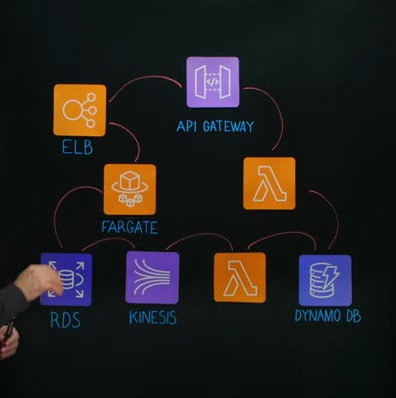
Temenos is the world's number one core banking platform. It is built entirely on the AWS cloud and uses all managed services. 

I was stuck with the simplicity of the overall architecture on AWS and how it enabled elastic scalability to scale-out for peak loads and also scale-back for reducing operational costs. 

Another interesting aspect was the simple implementation of the CQRS pattern to offload queries (read-only API requests) to DynamoDB. The pipeline was built using Kinesis and Lambda. 

An excellent short video on the AWS architecture of the Temenos platform is here: https://youtu.be/mtZvA7ARepM


Wednesday, April 15, 2020

Kafka poll() vs heatbeat()

In older versions of Kafka, the consumer was responsible for polling the broker frequently to prove that it is still alive. If the consumer does not poll() within a specified time-limit, then the broker considers that consumer to be dead and starts re-balancing the messages to other consumers.

But in latest versions of Kafka Consumer, a dedicated background heartbeat thread is started. This heartbeat thread sends periodic heartbeats to the broker to say -"Hey, I am alive and kicking!..I am processing messages and will poll() soon again".

Thus the newer versions of Kafka decouple polling functionality and heartbeat functionality. So now we have two threads running, the heartbeat thread and the processing thread (polling thread).
The heartbeat frequency is defined by the session.timeout.ms property (default = 10 secs)

Since there is a separate heartbeat thread now, the authors of Kafka Consumer decided to set the default for the polling timeout as INTEGER_MAX. (attribute: max.poll.interval.ms)
Hence no matter how long the processing takes (on the processing/polling thread), the Kafka broker will never consider the consumer to be dead. Only if no poll() request is received after INTERGER_MAX time, then the consumer would be considered dead.
.
Caveat: If your processing has a bug - (e.g. infinite loop, processing has called a third-party webservice and is stuck, etc.), then the consumer will never be pronounced dead and the messages will start getting piled up in that partition. Hence, it may be a good idea to set a realistic time for the polling() interval, so that we can rebalance the messages to other consumers. 

The following 2 stackoverflow discussions were extremely beneficial to us to help us understand the above.

https://stackoverflow.com/questions/47906485/max-poll-intervals-ms-set-to-int-max-by-default
https://stackoverflow.com/questions/39730126/difference-between-session-timeout-ms-and-max-poll-interval-ms-for-kafka-0-10-0


Saturday, October 20, 2018

Cloud computing from the trenches

My team is loving building applications on the cloud and scaling them. Some of the best practices that we implemented in the last few cloud projects are as follows:

1. Infrastructure as Code: It is imperative that you develop automation to build-up and tear-down your complete application infrastructure with just a click of a button. This includes provisioning data services such as RDBMS database, NoSQL data store and populating the data-stores with data. Follow this by deployment of your docker containers containing your web apps/microservices - all managed by Kubernetes. Then finally run a few synthetic transactions to validate the complete setup.

In one of our projects, we could build-up and tear-down the complete pre-prod environment using automation scripts.

2. Stateless Services: In order to have seamless elastic scalability on the cloud, it is important to design your services to be completely stateless. Any state that needs to be saved, should be done in an external store. We have successfully used Redis as the store for many stateful applications or sharing data across microservices.

3. Circuit Breakers and Graceful Degradation: Make sure that service calls happen through a circuit breaker (e.g. Netflix Hystrix).  This prevents overloading any system component in the event of a partial failure. Put in mechanisms for graceful degradation where ever possible - e.g. return data from a cache if database is down. Such measures avoid cascading failures.

4. Rolling updates and Canary Deployments: Kubernetes also supports a rolling update, so your downtime is reduced during service updates. Also canary deployments reduce the risk of introducing new features with faster GTM.

5. Autoscaling: Automate for elastic scalability - e.g. if a microservice is running on 4 containers, you should be able to scale-up and scale-down by a click of a button.

6. Redundancy / High Availability: Make sure that all your infrastructure services that are available as managed services on the cloud have redundancy across geographies built in - data stores, messaging middleware, noSQL stores, etc.  Make sure that your services are also deployed in a redundant manner across data centers.

Wednesday, August 29, 2018

Ruminating on Thread Pool sizes and names

Recently we were analyzing the thread-dumps of some JVMs in production and found a large number of threads created in certain thread-pools. Since the name of the thread-pool was generic (e.g. thread-pool-3, etc.) it was very difficult to diagnose the code that spawned the thread-pool.

The following code snippets should help developers in properly naming their thread-pools and also limiting the number of threads. In a cloud environment, the number of default threads in a pool will vary based on the CPU's available - for e.g. in the absence of a thread-pool size, the thread pool may grow to hundreds of threads.

We had seen this happen for the RabbitMQ java client. The default RabbitMQ java client uses a thread pool for callback messages (ACK) and the size of this thread-pool depends on the number of CPUs. Since the JVM is not aware of the docker config, all the processors on the host machine are considered and a large thread pool is created.

More details available here - https://github.com/logstash-plugins/logstash-input-rabbitmq/issues/93


Saturday, March 10, 2018

Identifying RabbitMQ consumers

One of the challenges my team was facing was to accurately identify the consumers of a RabbitMQ queue. Let's say if you have 5 consumers and you want to kill one of them through the dashboard, you need to identify the consumer.

Each consumer of RabbitMQ has a tag value that can be used to uniquely identify it. By default, RabbitMQ assigns some random number as the consumer tag, but just by looking at this random string tag there is no way to identify the actual consumer. 

To resolve this, you need to create a ConsumerTagStrategy and associate it with the MessageListenerContainer. Code snippet given below: 

Monday, January 08, 2018

The curious case of Java Heap Memory settings on Docker containers

On docker containers, developers often come across OOM (out-of-memory) errors and get baffled because most of their applications are stateless applications such as REST services.

So why do docker containers throw OOM errors even when there are no long-living objects in memory and all short-lived objects should be garbage collected?
The answer lies in how the JVM calculates the max heap size that should be allocated to the Java process.

By default, the JVM assigns 1/4 of the total physical memory as the max heap size for the Java runtime. But this is the physical memory of the server (or VM) and not of the docker container.
So let's say your server has a memory of 16 GB on which you are running 8 docker containers with each container configured for 2 GB. But your JVM has no understanding of the docker max memory size. The JVM will allocate 1/4 of 16 GB = 4 GB as the max heap size. Hence garbage collection MAY not run unless the full heap is utilized and your JVM memory may go beyond 2 GB.
When this happens, docker or Kubernetes would kill your JVM process with an OOM error.

You can simulate the above scenario and print the Java heap memory stats to understand the issue. Print the runtime.freeMemory(), runtime.MaxMemory() and runtime.totalMemory() to understand the patterns of memory allocation and garbage collection.

The diagram below gives a good illustration of the memory stats of JVM.


So how do we solve the problem? There is a very simple solution - Just explicitly set the max memory of the JVM when launching the program - e.g. java -Xmx 2000m -jar myjar.jar
This will ensure that the garbage collection runs appropriately and an OOM error does not occur.
A good article throwing more details on this is available here.

Also, it is important to understand that the total memory consumed by a Java process (called as Resident Set Size RSS) is equal to the heap size + Perm Size (MetaSpace) + native memory (required for thread stacks, file pointers). If you have a large number of threads, then native memory consumption can also be high (No. of threads * -Xss)

Max memory = [-Xmx] + [-XX:MaxPermSize/MaxMetaSpace] + [number_of_threads * (-Xss)] 

Since JDK 8, you can also utilize the following -XX parameters:
-XX:+UnlockExperimentalVMOptions -XX:+UseCGroupMemoryLimitForHeap //This allows the JDK to understand the CGroup memory limits on the Linux kernel
-XX:MaxRAM //This specifies the max memory allocated to the JVM...includes both on-heap and off-heap memory. 

In Java 10, a lot of changes have been made to the JDK to make it container friendly and you would not need to specify any parameters.

Other articles worth perusing are:
http://trustmeiamadeveloper.com/2016/03/18/where-is-my-memory-java/
https://developers.redhat.com/blog/2017/04/04/openjdk-and-containers/
https://dzone.com/articles/how-to-decrease-jvm-memory-consumption-in-docker-u
https://plumbr.io/blog/memory-leaks/why-does-my-java-process-consume-more-memory-than-xmx
http://stas-blogspot.blogspot.com/2011/07/most-complete-list-of-xx-options-for.html

If you wish to check all the -XX options for a JVM, then you can specify the following command.
java -XX:+UnlockDiagnosticVMOptions -XX:+PrintFlagsFinal -version

If you have a debug build of Java, then you can also try:
java -XX:+UnlockDiagnosticVMOptions -XX:+UnlockExperimentalVMOptions -XX:+PrintFlagsFinal -XX:+PrintFlagsWithComments -version

There are also tools that you can utilize to understand the best memory options to configure, such as the Java Memory Build Pack.
https://github.com/cloudfoundry/java-buildpack-memory-calculator
https://github.com/dsyer/spring-boot-memory-blog/blob/master/cf.md

Monday, July 17, 2017

Performance benefits of HTTP/2

The HTTP/2 protocol brings in a lot of benefits in terms of performance for modern web applications. To understand what benefits HTTP/2 brings, it is important to understand the limitations of HTTP/1.1  protocol.

The HTTP protocol only allows one 'outstanding' request per TCP connection - i.e. if a page is downloading 100 assets, only one request can be made per TCP connection. Browsers typically open 4-8 TCP connections per page to load the page faster (parallel requests), but this results in network congestion.

The HTTP/2 protocol is fully multiplexed - i.e. it allows multiple parallel requests/responses on the same TCP connection. It also compresses HTTP headers (reduce payload size) and is a binary protocol (not textual). The protocol also allows servers to proactively push responses directly to the browsers cache, thus avoiding HTTP requests.

The following links give an excellent explanation of the HTTP/2 protocol and its benefits.
https://http2.github.io/faq/
https://bagder.gitbooks.io/http2-explained/en/

The following site shows the performance of HTTP/2 compared to HTTP/1.1 when loading tons of images from the server - https://www.tunetheweb.com/performance-test-360/

There is another site - https://www.httpvshttps.com/ which states that HTTPS is faster than HTTP, but that is because HTTPS was using HTTP/2 by default in the background.

Friday, July 01, 2016

Ruminating on serverless execution environments

Since the past few months, I have been closely watching the serverless execution trends in the industry. I find the whole concept of writing serverless code on the cloud extremely exciting and a great paradigm shift.

Especially for mobile and IoT apps, I think the below serverless execution environments hold great promise. Developers don't have to worry about provisioning servers and horizontal scaling of their apps - everything is seamlessly handled by the cloud. And you only pay when your code is invoked !
  1. IBM OpenWhisk - http://www.ibm.com/cloud-computing/bluemix/openwhisk/
  2. Azure Functions - https://azure.microsoft.com/en-in/services/functions/
  3. Google Cloud Functions - https://cloud.google.com/functions/docs/
  4. AWS Lambda - https://aws.amazon.com/lambda/
It is also interesting to note that IBM has made the OpenWhisk platform open source under the Apache 2 license. The entire source code is available here - https://github.com/openwhisk/openwhisk
A good article explaining the underlying components of OpenWhisk is available here

Friday, January 22, 2016

Netty at Apple Inc.

I was pleasantly surprised to learn that most of Apple's cloud services run on Netty.

Norman Maurer had posted an excellent presentation on how Netty is being used at Apple and how many of the extreme performance requirements were met.

There are more than 400 thousand instances of Netty at Apple; handling millions of requests/sec. Netty powers all popular cloud services such as iCloud, iTunes, Siri, Apple Maps, etc.

Saturday, October 03, 2015

Handling failures and improving resilience in microservices

In a microservices architecture, one has to build services that can handle failures. For e.g. If a microservice calls another dependent microservice that is down, then we need to handle this using timeouts and implement the Circuit Breaker pattern.

Netflix has open-sourced an incredibly useful library called as Hystrix to solve such problems. Anyone building large scale distributed architectures on the Java platform would find Hystrix a boon. When you make a remote service call through Hystrix libraries, it does the following:

  1. If the remote service call does not return within a specified threshold, Hystrix times-out the call.
  2. If a service is throwing errors and the number of errors exceed a threshold, then Hystrix would trip the circuit-breaker and all requests would fail-fast for a specified amount of time (recovery period)
  3. Hystrix enables developers to implement a fall-back action when a request fails, for e,g returning a default value or a null value or from cache. 
The full operating model of Hystrix is explained in great details on Github wiki 

It was also interesting to learn that the tech guys at Flipkart have taken Hystrix and implemented a service proxy on top of it called 'Phantom'. Looks like the advantage of using Phantom is that your consumers do not have to code against the Hystrix libraries. 

Ruminating on Netflix Simian Army

A friend of mine introduced me to the a suite of powerful tools used at Netflix for testing the resilience and availability of their services. The suite of tools is called 'Simian Army', which essentially is a collection of tools such as 'Chaos Monkey', 'Latency Monkey', 'Security Monkey', etc.

I was aware that Netflix runs its entire IT infrastructure on AWS and was happy to hear that all the tools are available on Github here - https://github.com/Netflix/SimianArmy/wiki

A good introduction to the genesis behind these tools is given on the Netflix blog here - http://techblog.netflix.com/2011/07/netflix-simian-army.html

Another interesting blog on the lessons that Netflix learned after migrating to AWS is available here.


Monday, June 01, 2015

Ruminating on Shipping Containers and Docker

Today during one of the lectures at IIMB, I was introduced to a book called 'The Box' by Mark Levinson.

The book narrates the story of how the invention of the shipping container completely changed the face of global commerce. A snippet from the book -

"the cost of transporting goods was decisive in determining what products they would make, where they would manufacture and sell them, and whether importing or exporting was worthwhile. Shipping containers didn't just cut costs but rather changed the whole economic landscape. It changed the global consumption patterns, revitalizing industries in decay, and even allowing new industries to take shape."

A nice video explaining the same is available on YouTube - https://www.youtube.com/watch?v=IDmLEFDDd-c

A similar revolution is happening in the IT landscape by means of a new software container concept called as Docker. In fact, the logo of Docker contains an image of shipping containers :)

Docker provides an additional layer of abstraction (through a docker engine, a.k.a docker server) that can run a docker container containing any payload. This has made it really easy to package and deploy applications from one environment to the other.

A Docker container encapsulates all the code and its dependencies required to run an application. They are quite different from virtualization technology. A hypervisor running on a 'Host OS' essentially loads the entire 'Guest OS' and then runs the apps on top of it. In Docker architecture, you have a Docker engine (a.k.a Docker server) running on the Host OS. Each Docker server can host many docker containers. Docker clients can remotely talk with Docker servers using a REST API to start/stop containers, patch them with new versions of app, etc.

A good article describing the differences between them is available here - http://scm.zoomquiet.io/data/20131004215734/index.html

Source: http://scm.zoomquiet.io/data/20131004215734/index.html

All docker containers are isolated from each other using the Linux Kernel process isolation features.

In fact, it is these OS-level virtualization features of Linux that has enabled Docker to become so successful.

Other OS such as Windows or MacOS do not have such features as part of their core kernel to support Docker. Hence the current way to run Docker on them is to create a light-weight Linux VM (boot2docker) and run docker within it. A good article explaining how to run Docker on MacOS is here - http://viget.com/extend/how-to-use-docker-on-os-x-the-missing-guide

Docker was so successful that even Microsoft was forced to admit that it was a force to reckon with !
Microsoft is now working with Docker to enable native support for docker containers in its new Nano server operating system - http://thenewstack.io/docker-just-changed-windows-server-as-we-know-it/

This IMHO, is going to be a big game-changer for MS and would catapult the server OS as a strong contender for Cloud infrastructure. 

Ruminating on bare metal cloud environments

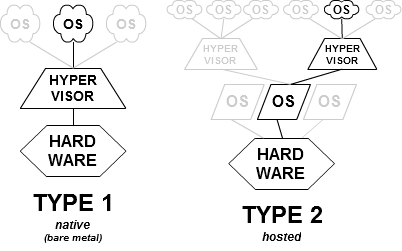
Virtualization has been the underpinning technology that powered the Cloud revolution. In a typical virtualized environment, you have the hypervisor (virtualization software) running on the Host OS. These type of hypervisors are called "Type 2 hypervisor".

But there are hypervisors that can be directly installed on hardware (i.e. hard disk). These hypervisors, know as "Type 1 hypervisors" do not need a host OS to run and have their own device drivers and other software to interact with the hardware components directly. A major advantage of this is that any problems in one virtual machine do not affect the other guest operating systems running on the hypervisor.

The below image from Wikipedia gives a good illustration.


Wednesday, September 25, 2013

Cloud Computing Guidance for Data Protection Act complaince

ico.org.uk has compiled a good list of questions that any organization should consider before it decides to leverage cloud computing solutions. The article also gives some good examples to help the reader understand the consequences of sharing personal data on the cloud. It also serves as a good primer for Cloud Computing.

http://www.ico.org.uk/for_organisations/data_protection/topic_guides/online/~/media/documents/library/Data_Protection/Practical_application/cloud_computing_guidance_for_organisations.ashx

Tuesday, August 06, 2013

Amazon S3 for websites

I was always under the impression that the Amazon AWS S3 service could be used only for storing any type of media content on the cloud. For e.g. images, JS, CSS, video files, etc.

But what surprised me is that we can host an entire static web site on an Amazon S3 bucket. No need to use a web server on an EC2 instance. Caveat Emptor: S3 does not support dynamic web sites.

The following links are handy to understand how to configure a S3 bucket for static web hosting. You can also pick up a good domain name for your static site using the domain name services provided by Amazon’s “Route 53″ DNS service. Amazon also offers a Content Delivery Network service(CloudFront CDN) that replicates content across Amazon’s network of global edge locations. So the S3 bucket would serve as the origin server and the CDN would provide the edge servers.

http://docs.aws.amazon.com/AmazonS3/latest/dev/WebsiteHosting.html
http://chadthompson.me/2013/05/06/static-web-hosting-with-amazon-s3/
http://www.labnol.org/internet/web-hosting-with-amazon-s3/18742/
http://www.labnol.org/internet/lower-amazon-s3-bill-improve-website-loading-time/5193/

Tuesday, July 10, 2012

UIaaS - UI as a Service

Some time back, Salesforce popularized the term - UIaaS (UI as a Service), when they launched VisualForce.

UIaaS essentially means the ability to create new user interfaces using pre-built components. UI components could be pages, controls, static resources, etc. So the concept is to not start from scratch, but use off-the-shelf UI widgets. Typically UI designers are web-based and allow for in-browser UI design.

The underlying technologies for creating UIaaS are –
Server Side: JSF, Portlets, .NET WebParts
Client Side: Dojo controls, JQuery controls, Ext-JS controls, etc.

IMHO, the term is just old wine in new bottle. We used to have concepts of UI Widget Factory that encompasses creating reusable widgets and storing them (with meta-data) in a repository. Application developers would then pick and choose their widgets and design new pages. The reusable widgets could be technical widgets such as a "tab-bar","menu-bar","calendar", etc. or business widgets such as "Healthcare Provider Search", "Google Maps Overlay", etc.